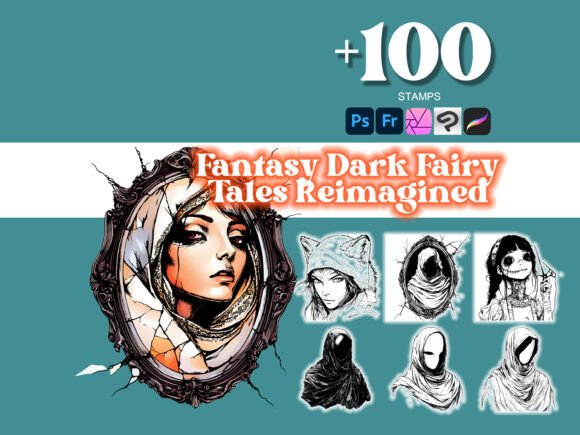
100 Dark Fairy Tales Reimagined Photoshop Brushes: Elevate Your Digital Art Workflow
Creating compelling digital art often requires more than just talent—it demands the right tools. The 100 Dark Fairy Tales Reimagined Photoshop Brushes offer a powerful way to enhance your creative process, whether you're designing for personal projects, client work, or commercial use. This collection is not just a set of brushes; it's a toolkit that integrates seamlessly into a broader creative workflow, helping you achieve professional results with greater efficiency.
The set includes 100 high-quality .abr brushes designed for Adobe Photoshop and Illustrator, with a bonus Procreate .brushset for digital artists who work on the go. These brushes are crafted with intricate detail, making them ideal for digital illustration, tattoo design, and craft-based projects. Whether you're creating concept art, book illustrations, or themed graphics, this brush set can become a core component of your design toolkit.
Integrating Dark Fairy Tales Brushes Into Your Creative Process
Before diving into a project, it's essential to understand how the 100 Dark Fairy Tales Reimagined Photoshop brushes fit into your existing workflow. Consider them a foundational asset that can be used at multiple stages of your creative process:
- Pre-Production: Use the brushes during the ideation phase to sketch out concepts with a thematic edge.
- Production: Apply the brushes directly to your artwork for textured effects, shadows, or intricate linework.
- Post-Processing: Enhance final visuals with overlays or texture brushes to add depth and mood.
Because the brushes are compatible with Photoshop, Illustrator, Affinity Designer, GIMP, Krita, and Procreate, they offer flexibility across platforms. This cross-program support means you can start a concept in Photoshop, refine it in Illustrator, and finish on your iPad using Procreate—without losing stylistic consistency.
Practical Use Cases and Workflow Examples
Let’s look at how different professionals might incorporate the Dark Fairy Tales Reimagined Collection into their work:
- Illustrators: Use the brushes to create atmospheric backgrounds or textured character designs that evoke a gothic or mystical feel.
- Tattoo Artists: Apply the brushes to mock up designs digitally before transferring them to skin, ensuring clarity and detail in linework and shading.
- Graphic Designers: Enhance branding or packaging visuals with dark fantasy elements, especially for niche markets like horror, fantasy, or alternative fashion.
- Writers and Publishers: Visualize book covers or internal illustrations with a thematic consistency that aligns with darker fairy tale motifs.
For example, a freelance illustrator working on a children's book with a gothic twist might start by sketching scenes using the base brushes, then layer in textures and overlays to create depth. Once the visuals are refined, they can export the files for print or digital use, confident that the brush quality maintains integrity across formats.
Ensuring Compatibility and Usability Across Platforms
One of the key strengths of the 100 Dark Fairy Tales Reimagined Photoshop brushes is their compatibility. Whether you're using a desktop workstation or an iPad, the brushes maintain consistent behavior and quality. This is especially useful for creatives who work across devices or environments—like sketching on the go with Procreate and refining in Photoshop on a desktop.
When importing brushes into a new program, always check brush settings to ensure pressure sensitivity, opacity, and flow are optimized for your stylus or tablet. For Photoshop users, simply load the .abr file into the Brushes panel. In Procreate, import the .brushset file directly into the app via the "Add" button in the Brushes menu.
Organization and Efficiency Tips
With a large brush set like this, organization is key to maintaining efficiency. Here are a few tips to streamline your workflow:
- Categorize brushes: Create brush presets or folders in your software to group similar brushes (e.g., textures, linework, splatters).
- Customize brush names: Rename brushes to match your project's themes or styles for easier access.
- Use brush shortcuts: Set keyboard shortcuts for frequently used brushes to speed up your workflow.
- Test brushes on a sample canvas: Before applying to your main artwork, test each brush to see how it behaves with different pressure settings and blending modes.
Quality Control and Long-Term Use
High-quality brushes like those in the Dark Fairy Tales Reimagined Collection should perform consistently across projects. To ensure long-term usability:
- Keep your brush library updated: If the creator releases updates or new versions, install them to maintain compatibility with the latest software versions.
- Backup your brush presets: Save your custom brush configurations so you can easily restore them if you switch devices or reinstall your software.
- Monitor brush performance: If certain brushes become laggy or inconsistent, consider adjusting their size or complexity to maintain smooth performance.
Final Thoughts on Implementation
Incorporating the 100 Dark Fairy Tales Reimagined Photoshop brushes into your creative process isn't just about adding visual flair—it's about enhancing your workflow with tools that support consistency, efficiency, and artistic depth. Whether you're a professional designer, a hobbyist, or an educator integrating digital tools into your curriculum, this brush set offers a versatile and practical solution.
By understanding how these brushes interact with your existing tools and processes, you can make informed decisions that improve both the quality of your work and the efficiency of your creative time. From concept to final output, the Dark Fairy Tales Reimagined Collection helps you bring your vision to life with precision and style.