School: A Creative Toolkit for Procreate Users
Procreate has become a go-to platform for digital artists, illustrators, and designers due to its intuitive interface and robust feature set. Within this ecosystem, custom brushes play a crucial role in shaping the final output. One standout set is School, a collection of stamp brushes designed with a charming sketch-style aesthetic. These brushes are more than just decorative elements—they serve as practical tools that can enhance workflows across a range of creative disciplines.
Understanding the School Brush Set
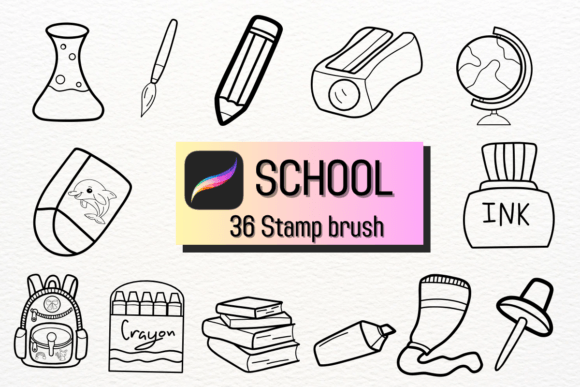
The School brush set is specifically designed to mimic hand-drawn sketches, offering a tactile, organic feel that digital tools often lack. Each brush functions as a stamp, allowing users to quickly place consistent, thematic elements into their compositions. This makes it especially useful for projects requiring a cohesive visual language with a personal touch.
Whether you're working on branding materials, event invitations, or educational content, the School brushes provide a way to infuse your work with a warm, approachable tone. Their sketch-style design bridges the gap between formal digital illustration and the imperfections of hand-drawn art, making them ideal for creators who want to maintain authenticity without sacrificing efficiency.
Integrating School into Creative Workflows
One of the strengths of the School brushes is their versatility across different stages of a creative process. Here's how they can be used effectively:
- Before a project: Use the brushes during the ideation phase to quickly sketch out visual themes or layout ideas. Their stamp format allows for rapid composition testing without the need for detailed drawing.
- Durring execution: Incorporate the brushes directly into your artwork for added texture or background elements. This is particularly useful in logo design, where a subtle sketch overlay can convey craftsmanship and approachability.
- After production: Apply the brushes in post-processing to enhance the final image. For example, adding soft sketch lines around a finished illustration can give it a more handcrafted appearance, ideal for packaging or editorial design.
Use Cases Across Industries
Designers, educators, and small business owners can all benefit from the School brush set. Here are a few examples of how different professionals might apply them:
- Wedding planners can use the brushes to embellish digital invitations or seating charts, giving them a personalized, hand-drawn feel.
- Freelance illustrators can integrate the brushes into client projects that require a more organic aesthetic, such as children's books or educational infographics.
- Entrepreneurs launching a brand might apply the brushes subtly in logo variations or social media templates to maintain a consistent, artisanal visual identity.
Compatibility and Workflow Efficiency
Because School is built for Procreate, it integrates seamlessly with the app’s existing tools, including layers, blending modes, and export settings. This compatibility ensures that artists can maintain their established workflows while adding new creative options.
For best results, consider the following tips:
- Layer wisely: Use the brushes on separate layers so you can adjust opacity, color, or blending without affecting the rest of your artwork.
- Customize brush settings: Adjust the pressure sensitivity or spacing to better match your drawing style.
- Organize your brush library: Keep the School brushes in a dedicated folder within Procreate for easy access during design sessions.
Quality Control and Consistency
When working with stamp brushes like those in the School set, maintaining visual consistency is key. Since each stamp is a repeated element, it's important to ensure they align well with the overall composition. A good practice is to test a few variations on a draft layer before committing to the final design.
Additionally, consider how the sketch-style aesthetic complements the other visual elements in your project. Overuse can lead to clutter, while thoughtful placement enhances the design. Always step back and evaluate the balance between the brushwork and the core content.
Long-Term Use and Adaptability
The School brush set is not a one-time-use tool. Its design allows for adaptability across various projects and evolving creative needs. As trends shift and your style develops, these brushes can be repurposed in new contexts.
For instance, a designer who initially used the brushes for wedding invitations might later apply them to a branding package for a boutique or a series of social media graphics. The key is to understand how the sketch aesthetic can be subtly adjusted—through color, scale, and placement—to suit different audiences and purposes.
Integration with Other Tools
While School is native to Procreate, its output can easily be integrated into other platforms. Exported artwork can be imported into Adobe Photoshop or Illustrator for further refinement, or into Canva for quick social media assets. This cross-platform compatibility makes the brushes a valuable addition to multi-tool workflows.
Moreover, if you're working with a team or collaborating with clients, the recognizable sketch style can serve as a unifying visual language across deliverables, ensuring that even when tools change, the aesthetic remains consistent.
Final Thoughts on Implementation
Incorporating the School brush set into your creative process isn't just about adding visual flair—it's about enhancing your ability to communicate warmth, authenticity, and craftsmanship through digital mediums. By understanding how and when to use these brushes, you can streamline your workflow while maintaining a unique artistic voice.
Whether you're a seasoned professional or a hobbyist looking to elevate your designs, the School brushes offer a practical yet expressive way to enrich your Procreate projects. With thoughtful integration and a focus on usability, they become more than just a brush set—they become a reliable part of your creative toolkit.