100 Procreate City Scape Stamps: Creative Power with Practical Pitfalls to Avoid
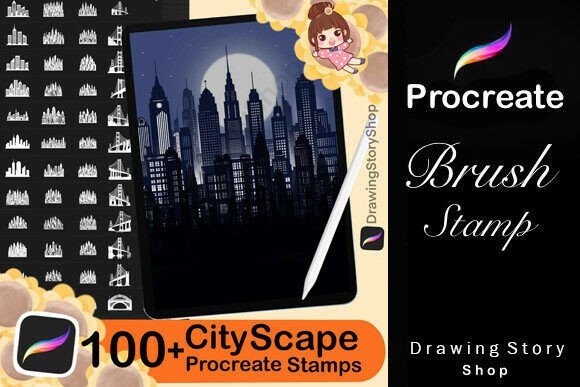
If you're a digital artist, designer, or content creator using Procreate on your iPad, you've probably come across the 100 Procreate City Scape Stamps bundle. It's a brushset bundle packed with city-themed elements like high-rise buildings, night scene silhouettes, and floor plans, all designed to speed up your urban landscape illustrations. But while this set offers a lot of creative flexibility, there are some important details and potential missteps you should know about before diving in.
What You Get (And What You Might Misunderstand)
The 100 Procreate City Scape Stamps include a variety of urban elements like:
- High-rise buildings
- Night scene silhouettes
- Building floor plans
- City skylines
- Detailed brush houses for texture
These are optimized for Procreate and can be a time-saver for creating complex backgrounds or architectural compositions. However, many buyers overlook the licensing terms or assume the stamps can be used in any way they like. This can lead to unexpected issues later.
Common Mistakes to Avoid
Let’s take a look at some of the most frequent errors people make when purchasing or using these stamps — and how to avoid them.
Mistake 1: Assuming You Can Resell the Stamps
One of the most common misunderstandings is that you can redistribute or resell the stamp files themselves. The license clearly states that you cannot share or sell the brushes or stamps as standalone digital files. If you're creating a digital product — like a printable cityscape poster — you're allowed to sell that finished artwork. But the actual brush files must remain with you.
Better Approach
If you're a digital product creator, use the stamps as part of your design process, not as the product itself. For example, create a digital sticker pack or social media graphic using the stamps, but don’t offer the brushes for download to your customers.
Mistake 2: Misusing the License for Commercial Brush Sets
Some creators attempt to bundle these stamps into their own brush sets for sale. This is not allowed. You can't claim ownership of the stamps or include them in any brushset you're offering to others — even if you're just giving it away for free.
Better Approach
Use the 100 Procreate City Scape Stamps to enhance your own unique brush collection. If you're creating a brush set to sell, make sure it's built from your own original brushes and not derived from this set.
Mistake 3: Ignoring the Import Instructions
After purchase, you’ll receive a PDF guide on how to import the brushes into Procreate. Some users skip this step and try to import the files directly, which often leads to confusion or errors.
Better Approach
Take a few minutes to read the included PDF. It walks you through the process step by step, ensuring you get the brushes installed correctly and ready to use without frustration.
Quality and Usability: What to Check Before You Buy
Before purchasing the 100 Procreate City Scape Stamps, it’s smart to do a quick evaluation of what you're getting and how it fits your needs.
Preview the Stamps
Most sellers provide a preview image or sample of the stamps included. Take a close look. Are the styles varied enough for your projects? Do they match the kind of cityscapes you want to create? If you're designing for a specific niche — like sci-fi city scenes or modern urban art — make sure the stamps align with that.
Test Compatibility
These stamps are designed for Procreate on iPad, but not all versions are the same. Check if the brushset is compatible with your version of Procreate. Older versions may not support certain brush features, which could limit functionality.
Understand the File Format
You’ll typically receive the brushes in .brushset format. Make sure you know how to handle this file type and that your device supports it. If you're new to Procreate, this might be a learning curve — but it’s a manageable one with the help of the included PDF guide.
Maximizing the Value of Your Stamps
Once you've installed the 100 Procreate City Scape Stamps, the real value comes from how you apply them in your creative work. Here are a few tips to help you get the most out of them:
Layer for Depth
Don’t just stamp once and call it done. Layer multiple cityscape elements to create depth and complexity. For example, use a high-rise silhouette in the background and a detailed building stamp in the foreground to add dimension.
Customize the Stamps
Procreate allows you to resize, rotate, and adjust the opacity of stamps. Experiment with blending modes and color overlays to make the stamps fit your specific color palette or mood — like turning a daytime cityscape into a glowing night scene.
Use in Digital Products
If you're an entrepreneur or small business owner, these stamps can help you create assets for digital products. Use them in social media templates, digital art prints, or even as part of website mockups — just remember not to sell the brushes themselves.
Final Thoughts: A Smart Creative Tool with Clear Boundaries
The 100 Procreate City Scape Stamps offer a powerful way to enhance your digital artwork and streamline your design process. Whether you're a beginner looking to create your first cityscape or a professional designer building assets for clients, this brushset can be a valuable addition to your toolkit.
But like any creative asset, it's important to understand the terms of use, technical requirements, and potential pitfalls. By avoiding common mistakes and using the stamps responsibly, you’ll ensure a smooth, productive experience — and keep your creative work legally sound and visually impressive.